Aumenta tu Productividad: Ideas Definitivas para tu Home Office con IA
Diseña un home office que impulse la concentración y la productividad sin sacrificar el estilo.
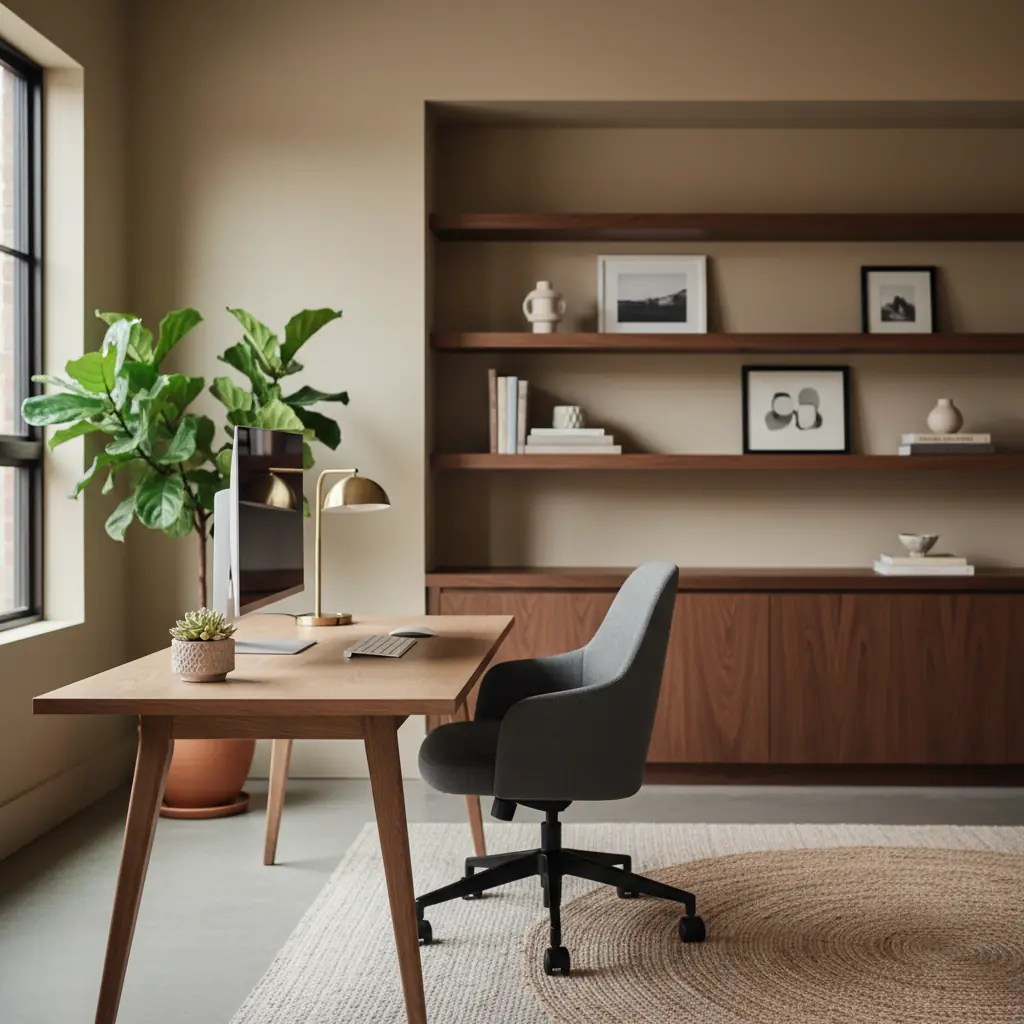
El Diseño de Tu Home Office: El Motor Invisible de Tu Productividad
En el panorama laboral dinámico actual, el home office ha evolucionado de una solución temporal a un elemento permanente para millones. Es más que un simple lugar para conectar tu laptop; es un ecosistema vital que influye profundamente en tu productividad, creatividad y bienestar general. Las investigaciones muestran consistentemente una correlación directa entre el diseño del espacio de trabajo y el rendimiento. Un escritorio abarrotado de objetos innecesarios no es solo una distracción visual; en realidad aumenta los niveles de cortisol, contribuyendo al estrés y la sobrecarga cognitiva. Una mala iluminación puede provocar fatiga visual, dolores de cabeza y cansancio prematuro, disminuyendo tu concentración a mitad del día. ¿Y una silla que carece de un soporte adecuado? Es un camino rápido al dolor de espalda que puede desviar tu concentración y energía mucho antes de que termine tu jornada laboral.
Diseñar un home office no es meramente un ejercicio de estética; es una inversión estratégica para crear un entorno donde tu mejor trabajo surja sin esfuerzo y de manera sostenible. Se trata de crear un santuario que minimice las distracciones, maximice la comodidad e inspire la innovación. Estudios recientes indican que los empleados con home offices bien diseñados reportan un aumento de hasta el **15% en la productividad** en comparación con aquellos que trabajan en espacios no optimizados, destacando los beneficios tangibles de un diseño bien pensado.
¿Dónde Deberías Colocar Tu Escritorio para Máxima Productividad?
La ubicación de tu escritorio es, posiblemente, la decisión más importante que tomarás al configurar tu home office. Dicta tu relación con la luz natural, controla el resplandor e influye en tu conexión visual con el entorno.
La posición óptima es perpendicular a una ventana. Esta orientación permite que la luz natural ilumine tu espacio de trabajo desde un lado, eliminando eficazmente el molesto reflejo en la pantalla mientras maximiza tu exposición a la revitalizante luz diurna. Esta iluminación lateral asegura que tu rostro esté bien iluminado para videollamadas sin causar fatiga visual por contraluz. Por el contrario, mirar hacia una pared con una ventana directamente detrás de ti crea un molesto resplandor en la pantalla y te hace aparecer en silueta en las videollamadas. Mirar directamente a la ventana, si bien ofrece una vista, puede causar fatiga visual por el exceso de brillo y los movimientos distractores del exterior.
La luz natural juega un papel fundamental en la regulación de nuestros ritmos circadianos, que afectan el sueño, el ánimo y los niveles de energía. Maximizar la exposición a la luz natural puede conducir a un mejor estado de ánimo y función cognitiva. Si tienes una ventana orientada al norte, te beneficiarás de una luz constante y suave durante todo el día, ideal para trabajos de precisión. Las ventanas orientadas al sur ofrecen luz abundante y fuerte que podría requerir persianas o cortinas translúcidas para difuminarla. Para diseños de habitaciones complicados o habitaciones con luz natural limitada, considera cómo podrías rebotar la luz utilizando espejos o paredes de colores claros.
### Dominando la Iluminación Artificial: Más Allá de la Lámpara de Escritorio
Si la luz natural es escasa o inconsistente, una configuración de iluminación artificial de alta calidad se vuelve primordial. Tu estrategia de iluminación debe incorporar tanto iluminación ambiental como de tarea.
Para tu escritorio, invierte en una lámpara de escritorio premium con brillo y temperatura de color ajustables. La luz cálida, típicamente entre 2700K y 3000K, es relajante y propicia para tareas creativas, lluvia de ideas o para desconectar. La luz fría, que va de 4000K a 5000K, imita la luz diurna y promueve el estado de alerta, lo que la hace ideal para el trabajo analítico, la lectura y la concentración sostenida. Algunas lámparas inteligentes incluso te permiten programar ajustes automáticos según la hora del día, alineándose con tus ciclos de luz natural. Considera integrar bombillas inteligentes en tus accesorios de techo también, permitiéndote controlar el ambiente general de la habitación. Nuestro [generador de paleta de colores con IA](/blog/ai-color-palette-generator) puede ayudarte a encontrar esquemas de iluminación complementarios que realcen los colores de pared elegidos.
El Imperativo Ergonómico: Invirtiendo en Tu Cuerpo y Cerebro
Si bien la estética es importante, un home office que ignora la ergonomía es un office que eventualmente causará incomodidad, dolor y una caída significativa en la productividad. Invertir en mobiliario y accesorios ergonómicos es una inversión en tu salud a largo plazo y concentración sostenida.
### La Silla Ergonómica: Tu Base de Apoyo
Esta es, posiblemente, la pieza de mobiliario más crítica. Una silla ergonómica de calidad debe ofrecer una amplia capacidad de ajuste, incluyendo:
- **Soporte Lumbar:** Crucial para mantener la curva natural de tu columna. Muchas sillas ofrecen profundidad y altura lumbar ajustables. - **Apoyabrazos:** Deben ser ajustables (altura, profundidad, giro) para sostener tus brazos y hombros, permitiendo que tus antebrazos estén paralelos al suelo al escribir. - **Profundidad del Asiento:** Asegúrate de que el asiento no sea demasiado largo o corto, dejando 2-4 pulgadas entre el borde del asiento y la parte posterior de tus rodillas. - **Ajuste de Altura:** Tus pies deben estar planos en el suelo o en un reposapiés, con las rodillas en un ángulo de 90 grados. - **Reclinación e Inclinación:** Para cambiar de postura a lo largo del día.
Si bien una silla de oficina básica podría costar entre $100 y $200, un modelo verdaderamente ergonómico típicamente comienza desde **$300 y puede superar los $1,000+** para opciones de gama alta como Herman Miller o Steelcase. Sin embargo, esta inversión rinde frutos: los estudios demuestran que una silla ergonómica puede reducir el dolor de espalda reportado en más del 80% y conducir a un aumento del 10-15% en comodidad y productividad durante períodos prolongados.
### El Escritorio: Sentarse, Estar de Pie y Todo lo Intermedio
Considera un escritorio de altura ajustable para promover el movimiento y reducir el tiempo sedentario. Los escritorios eléctricos de pie ofrecen ajustes de altura sin interrupciones y a menudo preajustes de memoria para tus alturas preferidas al sentarte y al estar de pie. La altura adecuada del escritorio, ya sea sentado o de pie, es crucial: tus antebrazos deben estar paralelos al suelo al escribir, y tus hombros relajados.
### Monitor, Teclado y Mouse
- **Ubicación del Monitor:** Coloca tu monitor (o monitores) a la distancia de un brazo, con la parte superior de la pantalla a la altura o ligeramente por debajo del nivel de los ojos. Esto previene la tensión en el cuello. Si usas una laptop, invierte en un soporte para elevarla a la altura correcta y usa un teclado y mouse externos. - **Teclado y Mouse:** Los teclados ergonómicos y los ratones verticales pueden reducir la tensión en tus muñecas y manos, especialmente si pasas horas escribiendo. Los reposamuñecas también pueden proporcionar soporte adicional.
El Enfoque de las Tres Zonas: Maximizando la Funcionalidad en Cualquier Espacio
Incluso en las habitaciones más compactas, reconocer distintas zonas funcionales puede mejorar drásticamente el flujo de trabajo y la claridad mental. Este enfoque fomenta transiciones conscientes entre diferentes tipos de trabajo, indicándole a tu cerebro cuándo cambiar de marcha.
1. **La Zona del Escritorio (Trabajo Enfocado):** Este es tu espacio de trabajo principal, dedicado a tareas activas y tácticas. Mantén esta área meticulosamente ordenada y libre de distracciones. Solo las herramientas esenciales, como tu computadora, monitor, teclado, mouse y una lámpara de tarea, deben residir aquí. Una estética minimalista aquí favorece la concentración profunda. 2. **La Zona de Pensamiento (Reflexión y Lluvia de Ideas):** A menudo pasada por alto, esta zona es crucial para el pensamiento creativo, la lectura, la lluvia de ideas o simplemente para tomar un descanso mental de tu pantalla. Un sillón cómodo, una chaise lounge o incluso un cojín de suelo mullido con una pequeña mesa auxiliar pueden servir para este propósito. La idea es tener un espacio distinto que señale "trabajo diferente", un cambio de la ejecución táctica a la contemplación expansiva y creativa. Posicionar esta zona junto a una ventana con una vista relajante, o cerca de una estantería, puede mejorar aún más su utilidad. 3. **La Zona de Referencia (Almacenamiento y Organización):** Esta zona alberga tus libros, archivos, suministros y cualquier recurso físico que necesites. Estanterías, libreros, archivadores o una credenza son ideales. El objetivo es un fácil acceso y almacenamiento organizado para evitar que el desorden invada tu zona de escritorio. Incorpora una mezcla de almacenamiento abierto y cerrado: exhibe objetos estéticamente agradables en estanterías abiertas y oculta los suministros menos atractivos pero necesarios en cajones o gabinetes.
Incluso en una habitación pequeña, estas zonas pueden coexistir a través de un diseño inteligente. Un escritorio montado en la pared que se pliega, un cómodo cojín de suelo guardado debajo de una estantería o una pieza de mobiliario multifuncional pueden ayudar a definir estas áreas. Para ideas sobre cómo optimizar la distribución en habitaciones más pequeñas o de formas inusuales, explora nuestra [herramienta de organización de muebles con IA](/blog/ai-furniture-arrangement-tool).
Gestión de Cables: El Héroe Anónimo de un Espacio Sereno
Nada socava la sensación de un espacio de trabajo profesional y bien diseñado más rápido que un enredo de cables visibles y regletas. El "espagueti de cables" no es solo una molestia visual; es un imán para el polvo, un riesgo de tropiezo y una fuente sutil de caos visual que puede perturbar tu concentración.
La inversión en una gestión adecuada de cables es mínima, típicamente entre **$15 y $50 para accesorios esenciales**, pero el impacto psicológico es profundo. Una superficie de escritorio limpia sin cables visibles señala "espacio de trabajo profesional" y "mente organizada" cada vez que te sientas.
Así es como puedes lograr una gestión de cables impecable:
- **Bandejas para Cables Debajo del Escritorio:** Se fijan fácilmente a la parte inferior de tu escritorio, proporcionando un canal discreto para guiar regletas y la longitud sobrante de cables. - **Manguitos y Envolturas para Cables:** Agrupa múltiples cables en una sola funda ordenada, reduciendo el desorden visual. - **Clips Adhesivos para Cables:** Asegura los cables a lo largo del borde de tu escritorio o pared para mantenerlos fuera de la vista. - **Pasacables de Escritorio:** Si tu escritorio carece de ellos, considera instalar pasacables (aberturas circulares) para pasar los cables, minimizando los cables visibles en el escritorio. - **Periféricos Inalámbricos:** Opta por teclados, ratones y bases de carga inalámbricas siempre que sea posible para eliminar varios cables por completo. - **Regletas Inteligentes:** Busca regletas con interruptores individuales o protección contra sobretensiones incorporada que puedan esconderse.
La implementación de estas soluciones crea una estética minimalista que favorece la concentración sostenida y facilita mucho la limpieza de tu espacio de trabajo. Un ambiente libre de desorden, incluidos los cables invisibles, contribuye a una sensación de calma y orden que mejora tu experiencia laboral general. Puedes ver ejemplos de diseños tan limpios y modernos explorando [cómo funciona el diseño de interiores con IA](/blog/ai-interior-design-how-it-works).
Tu Fondo de Videollamada: Una Restricción de Diseño y una Declaración Profesional
En la era del trabajo remoto, tu fondo de videollamada se ha convertido en una extensión de tu imagen profesional. Pasas horas interactuando con colegas, clientes y socios a través de una lente, y lo que ven detrás de ti moldea su percepción. Un fondo bien pensado ya no es un lujo, sino una necesidad. Un fondo de videollamada profesional y libre de desorden puede mejorar la credibilidad percibida hasta en un **60%**, algo crítico en el entorno empresarial actual prioritariamente remoto.
Más allá de ser simplemente "limpio", busca un fondo que proyecte competencia, buen gusto y una sensación de calma.
- **Pared Minimalista con Arte:** Una pared lisa con una única pieza de arte de buen gusto puede ser increíblemente efectiva. Es limpia, no distrae y añade un toque de personalidad. - **Estantería Curada:** Una estantería no es solo para libros. Dispón una mezcla de libros, objetos decorativos y quizás una pequeña planta. Evita estanterías excesivamente recargadas o pilas de papeles desorganizados. La clave es la curación, no el desorden. - **Rincón Lleno de Plantas:** Incorporar vegetación añade instantáneamente vida, frescura y una estética relajante. Una planta alta bien ubicada o un estante con algunas plantas en macetas más pequeñas pueden crear un telón de fondo acogedor y profesional. - **Iluminación Estratégica:** Asegúrate de que tu rostro esté bien iluminado, idealmente desde el frente o ligeramente de lado. Evita el contraluz, que te silueteará, o la iluminación cenital dura que proyecta sombras poco favorecedoras. Una pequeña luz anular o softbox puede hacer una gran diferencia en tu apariencia en cámara.
Considera tu marca personal y el mensaje que quieres transmitir. ¿Es moderno y elegante, cálido y accesible, o creativo y ecléctico? Con Habitas, puedes subir tu habitación actual y ver cómo la IA genera instantáneamente opciones de fondo sofisticadas, ayudándote a presentar tu mejor versión profesional en cada llamada. La IA crea fondos que se ven tan bien en cámara como en persona, asegurando que tu presencia virtual siempre sea pulcra.
Psicología del Color en el Home Office: Pintando Tu Camino Hacia la Productividad
Los colores tienen un profundo impacto psicológico, influyendo en nuestro estado de ánimo, niveles de energía e incluso el rendimiento cognitivo. Seleccionar la paleta de colores adecuada para tu home office puede apoyar o dificultar tu productividad.
- **Azules:** A menudo asociados con la calma, la estabilidad y la productividad. Los azules más claros pueden crear un ambiente sereno y centrado, haciéndolos excelentes para el trabajo analítico. - **Verdes:** Evocan la naturaleza, el equilibrio y la armonía. Los tonos verdes son conocidos por reducir la fatiga visual y promover una sensación de bienestar y creatividad, haciéndolos adecuados para tareas que requieren innovación. - **Amarillos:** Pueden infundir energía, optimismo y creatividad. Usa el amarillo con moderación, quizás como color de acento, ya que demasiado puede ser sobreestimulante y generar ansiedad. - **Grises y Blancos:** Ofrecen un telón de fondo limpio y minimalista que promueve la claridad y la organización. Son versátiles y pueden combinarse con acentos vibrantes para evitar que el espacio se sienta estéril. - **Neutros (Beige, Taupe):** Crean una atmósfera cálida, acogedora y atemporal. Son menos distractores que los colores llamativos y pueden contribuir a un ambiente de trabajo tranquilo.
Al elegir, considera el tipo de trabajo que realizas, tus preferencias personales y la cantidad de luz natural que recibe la habitación. Una habitación más luminosa puede manejar tonos más ricos y profundos, mientras que una habitación más oscura podría beneficiarse de colores más claros y reflectantes. Nuestro [generador de paleta de colores con IA](/blog/ai-color-palette-generator) es una excelente herramienta para experimentar con diferentes combinaciones y visualizar cómo transformarán tu espacio.
Diseño Biofílico: Trayendo la Naturaleza al Interior
Integrar elementos de la naturaleza en tu home office, un concepto conocido como diseño biofílico, ofrece beneficios significativos para el bienestar y la productividad. Los estudios demuestran que la exposición a elementos naturales puede reducir el estrés, mejorar la función cognitiva y potenciar la creatividad.
- **Plantas de Interior:** Más allá de su atractivo estético, muchas plantas purifican el aire, reducen el ruido y añaden una presencia relajante. Elige variedades de bajo mantenimiento como sansevierias (snake plants), zamioculcas (ZZ plants), pothos o lirios de la paz. Para más ideas, explora nuestra guía sobre las [mejores plantas para diseño de interiores](/blog/best-plants-for-interior-design). - **Materiales Naturales:** Incorpora madera, piedra, corcho o bambú en tus muebles, pisos o decoración. Estos materiales nos conectan con el mundo natural y añaden calidez y textura. - **Luz Natural y Vistas:** Maximiza la luz natural como se mencionó anteriormente, y si es posible, orienta tu escritorio para que ofrezca una vista de vegetación o del exterior. - **Fuentes de Agua:** Una pequeña fuente de escritorio puede proporcionar un sonido ambiental relajante y mejorar la relajación. - **Arte Inspirado en la Naturaleza:** Paisajes, estampados botánicos o arte abstracto inspirado en formas naturales también pueden traer el exterior al interior.
Incluso unas pocas plantas cuidadosamente colocadas pueden marcar una diferencia sustancial, transformando tu oficina en un espacio más vibrante, relajante e inspirador.
Soluciones de Almacenamiento Inteligentes: Más Allá de lo Básico
Si bien la "zona de referencia" maneja tus materiales de trabajo principales, el almacenamiento estratégico en toda tu oficina es clave para mantener un ambiente libre de desorden y eficiente.
- **Almacenamiento Cerrado:** Utiliza archivadores, credenzas y gabinetes con puertas para ocultar elementos menos atractivos, archivos extensos o suministros más voluminosos. Esto crea inmediatamente una línea visual más limpia. - **Estanterías Abiertas (Curadas):** Para los elementos que quieras exhibir —objetos decorativos, una selección de libros o pequeñas plantas— las estanterías abiertas son ideales. El truco es mantenerlas cuidadosamente curadas, evitando el amontonamiento. - **Unidades de Cajones:** Las cajoneras móviles o los cajones incorporados debajo de tu escritorio son perfectos para mantener los elementos esenciales diarios (bolígrafos, cuadernos, cargadores) al alcance de la mano pero fuera de la vista. - **Almacenamiento Vertical:** En espacios más pequeños, aprovecha el espacio de la pared con estantes flotantes, organizadores montados en la pared o libreros altos. Esto libera valioso espacio en el suelo y evita que las superficies horizontales se conviertan en vertederos. - **Estrategias para Despejar:** Elimina regularmente los elementos innecesarios. Aplica principios como el método KonMari o la regla del 80/20 (solo usas el 20% de tus artículos el 80% del tiempo) para mantener tu oficina ágil y funcional.
El almacenamiento efectivo contribuye directamente a la claridad mental. Cuando todo tiene un lugar designado, tu cerebro no tiene que gastar energía procesando el desorden visual, liberando recursos cognitivos para tu trabajo real.
Personalización e Inspiración: Haciéndolo Verdaderamente Tuyo
Si bien adherirse a los principios ergonómicos y las estrategias de organización es crucial, tu home office también debe reflejar tu personalidad e inspirar tu mejor trabajo. Esta personalización es lo que transforma un espacio funcional en uno verdaderamente motivador.
- **Arte y Decoración:** Elige obras de arte, fotografías u objetos decorativos que resuenen contigo. Una pared de galería con imágenes inspiradoras, una pieza de arte apreciada o logros personales enmarcados pueden hacer el espacio tuyo de forma única. - **Experiencia Sensorial:** No olvides el poder del aroma y el sonido. Un difusor de aceites esenciales con aromas vigorizantes como menta o cítricos puede aumentar la concentración, mientras que los auriculares con cancelación de ruido pueden crear un santuario sónico. - **Texturas y Comodidad:** Incorpora texturas suaves a través de una alfombra, una manta sobre tu sillón de pensamiento o elementos tapizados. Estos añaden calidez y comodidad, haciendo el espacio más acogedor. - **Tablero de Inspiración (Mood Board):** Crea un tablero de inspiración digital o físico de tus metas, inspiraciones y preferencias estéticas. Sirve como un recordatorio visual de lo que estás trabajando para lograr y puede despertar la creatividad.
Tu home office debe ser un lugar donde te sientas cómodo, seguro y con carga creativa. Cuando tu entorno refleja quién eres y lo que aspiras a lograr, se convierte en un poderoso catalizador para la productividad. Herramientas como Habitas te permiten experimentar con diferentes elementos de diseño en la foto real de tu habitación, permitiéndote visualizar y refinar estos toques personales antes de hacer cualquier compromiso.
Conclusión: Creando Tu Santuario Productivo
Diseñar un home office que realmente maximice la productividad y el bienestar es un arte y una ciencia. Se trata de tomar decisiones intencionales, desde la ubicación fundamental de tu escritorio y el soporte ergonómico debajo de ti, hasta la psicología sutil del color y la presencia relajante de la naturaleza. Cada elemento, por pequeño que sea, contribuye al ecosistema general de tu espacio de trabajo.
Al implementar estas estrategias, no solo estás decorando una habitación; estás diseñando un entorno que fomenta la concentración, inspira la creatividad y apoya tu salud. Este diseño intencional se traduce directamente en un mejor rendimiento, energía sostenida y una experiencia de trabajo desde casa más gratificante. Da el primer paso hacia tu espacio de trabajo ideal hoy mismo. Sube tu home office a Habitas y deja que la IA transforme tu visión en una realidad perfectamente optimizada.
Preguntas Frecuentes
### ¿Cuánto cuesta configurar un home office productivo?
El costo de configurar un home office productivo puede variar ampliamente dependiendo de tus muebles existentes, la calidad deseada y tus necesidades específicas. Una configuración básica y funcional con una silla ergonómica ($300-$500), un escritorio decente ($150-$300) e iluminación esencial ($50-$100) podría oscilar entre **$500 y $900**. Sin embargo, una configuración premium que incorpore un escritorio eléctrico de altura ajustable ($500-$1000+), una silla ergonómica de alta gama ($700-$1500+), iluminación avanzada y decoración estética podría fácilmente alcanzar los **$2,000 a $5,000 o más**. Es una inversión, pero que puede impactar significativamente la salud y la productividad a largo plazo.
### ¿Cuál es el mejor color para un home office para mejorar la concentración?
Para mejorar la concentración y promover un ambiente tranquilo pero productivo, los azules y verdes son a menudo recomendados. Los tonos más claros de azul se asocian con la estabilidad, la tranquilidad y el pensamiento analítico, haciéndolos excelentes para tareas que requieren concentración. Los verdes evocan la naturaleza, el equilibrio y la creatividad, conocidos por reducir la fatiga visual y fomentar una sensación de bienestar. Los colores neutros como grises suaves, blancos y beiges claros también funcionan bien como base, proporcionando un telón de fondo limpio que minimiza las distracciones, permitiéndote añadir color a través de acentos.
### ¿Cómo puedo crear un home office en un espacio pequeño o una habitación compartida?
Crear un home office funcional en un espacio pequeño requiere planificación inteligente y muebles multifuncionales. Considera un escritorio montado en la pared o flotante que ocupe un espacio mínimo en el suelo, o un escritorio de esquina para maximizar un área a menudo no utilizada. El almacenamiento vertical, como libreros altos y estrechos o estantes montados en la pared, es crucial para la organización sin invadir el espacio del suelo. Los muebles multifuncionales como un otomán de almacenamiento que funciona como asiento, o un sofá cama en una habitación de invitados, también pueden ayudar. Utiliza particiones, biombos o incluso alfombras distintas para separar visualmente tu "zona de oficina" del resto de la habitación, señalando un cambio de actividad.
### ¿Cuáles son los elementos esenciales para un home office ergonómico?
Los elementos esenciales para un home office ergonómico se centran principalmente en apoyar una postura saludable y reducir la tensión. Estos incluyen:
1. **Silla Ergonómica:** Totalmente ajustable con soporte lumbar, apoyabrazos y profundidad de asiento. 2. **Escritorio Adecuado:** Un escritorio a la altura correcta, o un escritorio de altura ajustable para mayor flexibilidad. 3. **Monitor Externo:** Colocado a la altura de los ojos (con un soporte si usas una laptop) y a la distancia de un brazo. 4. **Teclado y Mouse Ergonómicos:** Para minimizar la tensión en muñecas y manos. 5. **Iluminación de Tarea:** Una lámpara de escritorio ajustable para iluminación focalizada. 6. **Reposapiés (Opcional pero recomendado):** Si tus pies no descansan planos en el suelo. Estos elementos trabajan juntos para crear un ambiente de apoyo que previene la incomodidad y promueve la productividad sostenida.
### ¿Con qué frecuencia debo revaluar la configuración de mi home office?
Es una buena práctica revaluar la configuración de tu home office al menos una o dos veces al año, o cada vez que tu rutina de trabajo cambie significativamente. Una revisión trimestral para despejar y hacer ajustes menores puede ser muy beneficiosa. Anualmente, echa un vistazo más completo a tu configuración ergonómica, iluminación y estética general. A medida que tu cuerpo cambia, o a medida que nuevas innovaciones ergonómicas están disponibles, podrías necesitar ajustar tu silla, la altura del monitor o incluso considerar nuevos accesorios. Evaluar regularmente tu espacio asegura que continúe satisfaciendo tus necesidades cambiantes y apoye tu bienestar y productividad.
### ¿Puede la IA realmente ayudarme a diseñar mi home office de manera efectiva?