Dominando Layouts de Ambientes: Organize Móveis Como um Designer de Interiores
Desvende segredos de design profissional para layouts de ambientes perfeitos que transformam qualquer espaço em um santuário funcional e belo.
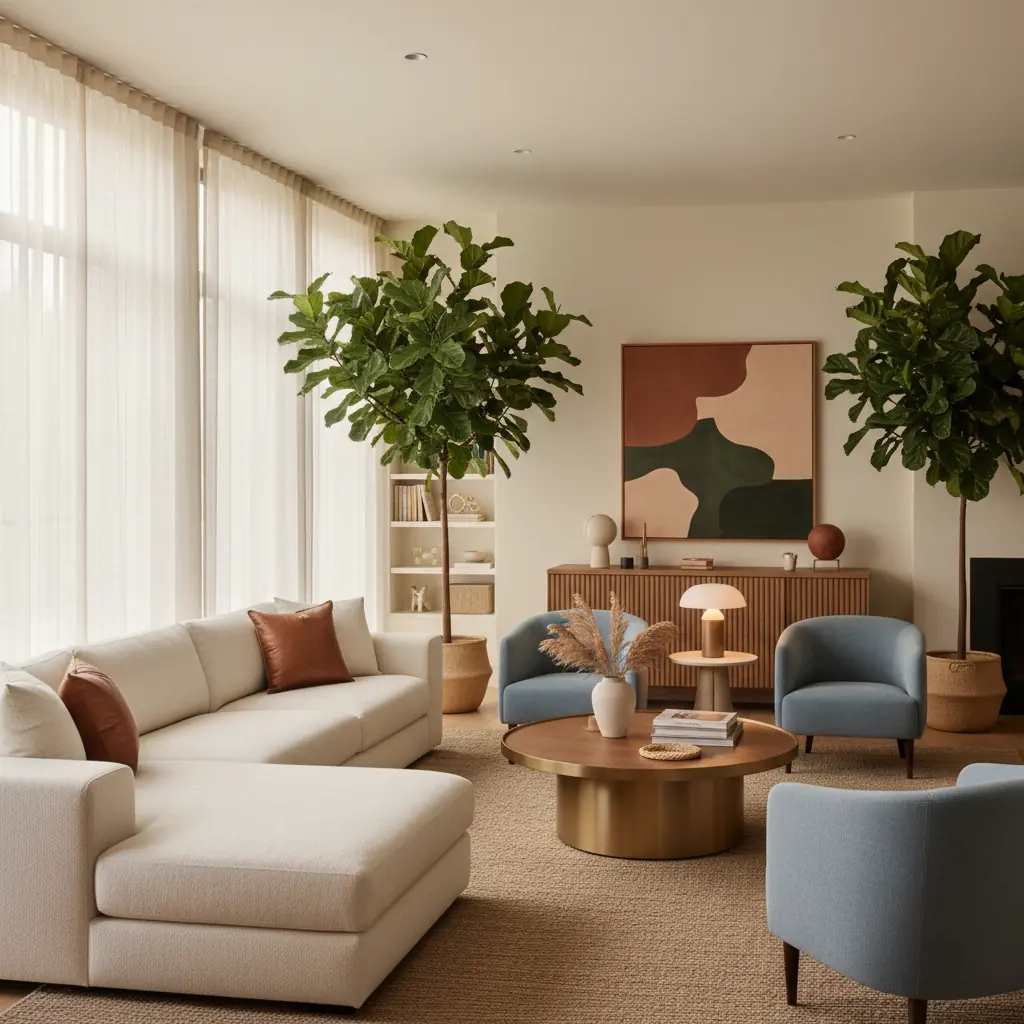
Por Que o Layout do Ambiente É Mais Importante Que o Estilo do Móvel
Imagine entrar em um ambiente repleto de móveis requintados e de alta qualidade – um sofá de veludo deslumbrante, uma mesa de centro meticulosamente trabalhada, iluminação de design. No entanto, algo parece errado. É apertado, difícil de navegar e desconfortável. Agora, imagine um ambiente com móveis modestos, talvez até de segunda mão, mas onde cada peça está perfeitamente posicionada, o fluxo é suave e o assento convida à conversa. Qual ambiente parece mais convidativo, mais "desenhado"?
A resposta, quase sempre, é o último. Isso ilustra uma verdade fundamental no design de interiores: o layout é primordial. Um ambiente com móveis bonitos em um layout ruim parece errado e ineficiente. Um ambiente com móveis modestos em um ótimo layout parece intencional, confortável e funcional. O layout determina como o ambiente funciona, como o tráfego flui e, o mais importante, como as pessoas se sentem ao entrar.
Antes de comprar um único móvel, ou mesmo de decidir uma cor de tinta, planeje o arranjo. Frequentemente, o melhor primeiro passo é "comprar em sua própria casa" – mova o que você já tem para entender as possibilidades do seu espaço antes de procurar o que deseja. Essa abordagem estratégica economiza tempo, dinheiro e evita erros de design caros.
Como Identificar e Usar o Ponto Focal de um Ambiente?
Todo ambiente bem desenhado precisa de um ponto focal. Esta é a estrela do espetáculo, o elemento que imediatamente atrai o olhar e ancora todo o espaço. Pode ser uma grande lareira, uma janela ampla com uma vista deslumbrante, uma televisão montada na parede ou uma obra de arte cativante. Uma vez identificado, o arranjo principal de assentos deve ser orientado para este ponto focal, criando um ponto natural de interesse e interação.
Se um ambiente tem múltiplos pontos focais potenciais – digamos, uma lareira e uma janela grande – escolha um como principal e deixe os outros desempenharem papéis de suporte. Tentar fazer de tudo um ponto focal frequentemente resulta em um design confuso e desordenado. Por exemplo, em uma sala de estar, se sua TV está em uma parede e uma lareira em outra, você pode orientar o sofá principal para a lareira, usando-a para o aconchego estético, e então posicionar uma poltrona de destaque ou um arranjo de assentos menor que possa ver confortavelmente a TV para entretenimento.
O ponto focal determina a orientação do ambiente e ajuda a ditar o posicionamento de todos os outros elementos. Tudo o mais — assentos secundários, mesas laterais, iluminação e acessórios decorativos — flui dessa relação primária, aprimorando em vez de competir com a característica principal. Se o seu ambiente não possui um ponto focal natural, você pode criar um! Uma parede de galeria marcante, uma parede de destaque pintada com ousadia ou um móvel de destaque podem servir a esse propósito. É aqui que sua criatividade realmente brilha, transformando uma tela em branco em um espaço com personalidade e propósito.
Entendendo o Fluxo de Tráfego: O Elemento de design Invisível
Imagine tentar navegar por uma pista de obstáculos na sua própria sala de estar. Se você está constantemente esbarrando em móveis, apertando-se entre cadeiras ou fazendo desvios, seu fluxo de tráfego está fundamentalmente falho. As pessoas precisam de caminhos claros e desobstruídos através de um ambiente, sem ter que contornar móveis. Este "elemento de design invisível" é crucial para um lar confortável e funcional.
A faixa principal de tráfego – o caminho de uma porta para outra, ou para uma área frequentemente usada como a cozinha – deve ter pelo menos 36 polegadas de largura. Isso permite que duas pessoas passem confortavelmente ou que alguém caminhe com facilidade, mesmo carregando itens. Caminhos secundários, como a rota para uma janela, uma estante de livros ou um móvel específico, precisam de pelo menos 24 polegadas de espaço livre. Pense em como você geralmente se move pela sua casa. Você costuma andar em linha reta ou tende a cortar caminho? Um bom layout antecipa esses movimentos naturais.
Caminhe pelo seu ambiente lentamente e de propósito. Observe para onde você naturalmente quer ir e onde encontra resistência. Se os móveis o forçam a desviar, ou se você se encontra constantemente ajustando seu caminho, o layout provavelmente está errado. Bons layouts parecem sem esforço — você se move pelo espaço sem pensar nisso, permitindo uma experiência de vida fluida. Em uma casa típica, caminhos de tráfego insuficientes (menos de 36 polegadas para rotas principais) são citados como uma causa comum de frustração em mais de 60% das reclamações de proprietários sobre seus espaços de convivência. Isso destaca o quão crítico é o planejamento eficaz do espaço para o conforto diário.
Por Que a Distância de Conversa Importa para o Conforto
Você já esteve em uma festa onde precisava gritar através de uma vasta sala de estar para ouvir alguém? É estranho e rapidamente desestimula a interação. Assentos dispostos a mais de 8 pés de distância tornam a conversa desconfortável, forçando as pessoas a elevar a voz. A "distância ideal de conversa" é tipicamente entre 3 e 8 pés, promovendo intimidade e diálogo fácil.
Se sua sala de estar é particularmente grande, resista à tentação de espalhar os móveis por todo o espaço. Em vez disso, crie agrupamentos de conversa distintos. Uma área de assentos principal (um sofá e duas poltronas, por exemplo) deve ter suas peças dispostas dentro desse raio máximo de 8 pés. Você pode então usar o restante do ambiente para criar zonas secundárias – talvez um canto de leitura com uma única poltrona e uma luminária de piso, ou uma pequena escrivaninha para home office. Casas com agrupamentos de conversa otimizados são classificadas como 30% mais convidativas pelos convidados, incentivando a interação e a sensação de acolhimento.
Um dos erros de layout mais comuns é empurrar todos os móveis contra as paredes. Isso cria um centro vazio e cavernoso e um perímetro pouco convidativo. Em vez disso, afaste os móveis das paredes. Flutuar um sofá mesmo que 6 polegadas para dentro do ambiente cria uma sensação mais íntima e organizada do que empurrar tudo contra o perímetro. Isso também permite um fluxo de tráfego melhorado atrás de peças maiores, ou oferece espaço para aparadores, luminárias de piso ou até mesmo estantes de livros. Quando os móveis podem "respirar", o ambiente parece mais dinâmico e propositalmente projetado.
Além do Básico: Princípios Avançados de Layout
Uma vez que você dominou pontos focais, fluxo de tráfego e distância de conversa, considere esses elementos adicionais para elevar seu layout:
### A Importância da Escala e Proporção
Escolher móveis com o tamanho adequado para o seu ambiente é fundamental. Um sofá modular oversized em uma sala pequena fará com que o espaço pareça apertado e visualmente pesado, enquanto peças minúsculas em um ambiente grandioso parecerão perdidas e insignificantes. Meça seu ambiente e os móveis com cuidado. Considere o peso visual das peças – um sofá escuro e sólido parecerá mais pesado do que um claro e com pernas visíveis, mesmo que tenham o mesmo tamanho físico. Em espaços com menos de 250 pés quadrados, cada polegada conta, e o posicionamento estratégico dos móveis pode fazer um ambiente parecer 20-30% maior e mais funcional. Para orientações sobre como maximizar ambientes menores, explore nossas [soluções para formatos de ambientes difíceis](/blog/awkward-room-shape-solutions).
### Como Tapetes Definem o Espaço e Ancoram os Móveis?
Tapetes não são apenas decorativos; eles são ferramentas poderosas para definir zonas e ancorar o arranjo dos seus móveis. Um tapete deve ser grande o suficiente para que pelo menos as duas pernas dianteiras de todas as peças de assento principais repousem sobre ele. Isso cria uma "ilha" coesa para o seu agrupamento de conversa. Um tapete muito pequeno pode fazer o ambiente parecer desconectado e fragmentado. Em uma sala de jantar, certifique-se de que o tapete seja grande o suficiente para que as cadeiras permaneçam sobre ele mesmo quando afastadas.
### Usando a Iluminação para Aprimorar Layouts
A iluminação desempenha um papel crucial no aprimoramento do seu layout e na atmosfera geral de um ambiente. Não dependa apenas da iluminação do teto. Incorpore uma mistura de iluminação ambiente (iluminação geral), de tarefa (para leitura ou trabalho) e de destaque (para realçar arte ou características arquitetônicas). Luminárias de piso, luminárias de mesa e arandelas podem definir zonas, adicionar interesse visual e proporcionar flexibilidade. Por exemplo, uma luminária de piso ao lado de uma poltrona delimita claramente um canto de leitura. Um plano de iluminação bem pensado pode fazer com que mesmo o layout mais básico pareça luxuoso e convidativo.
### Criando Equilíbrio: Simetria vs. Assimetria
O equilíbrio em um ambiente cria uma sensação de harmonia. Layouts simétricos, frequentemente vistos em ambientes formais, utilizam elementos idênticos espelhados em um eixo central (por exemplo, dois sofás iguais de frente um para o outro com uma mesa de centro entre eles). Layouts assimétricos, mais comuns em designs modernos e ecléticos, alcançam o equilíbrio usando elementos diferentes, mas visualmente pesados (por exemplo, um sofá grande equilibrado por duas poltronas menores e um aparador no lado oposto). Ambas as abordagens podem ser eficazes; a chave é garantir que o ambiente pareça visualmente estável, e não desequilibrado.
Evitando Erros Comuns de Layout
Mesmo designers experientes podem cair em certas armadilhas. Estar ciente desses erros comuns pode poupar-lhe muita dor de cabeça:
- **Empurrar Tudo Contra as Paredes:** Como discutido, isso cria um vazio pouco convidativo no centro. Afaste as peças, mesmo que ligeiramente, para criar um espaço mais dinâmico e íntimo. - **Bloquear Janelas ou Portas:** Este é um erro funcional e estético. Certifique-se de que todas as entradas, janelas e características embutidas sejam facilmente acessíveis e desobstruídas. - **Ignorar o Formato do Ambiente:** Não tente forçar um layout retangular em um ambiente em forma de L. Abrace a geometria única e use-a a seu favor, criando zonas distintas. - **Muitos ou Poucos Móveis:** O excesso de móveis faz um ambiente parecer apertado; a falta de móveis o torna austero e inacabado. Busque um equilíbrio que ofereça funcionalidade sem desordem. - **Falta de Propósito:** Cada zona e cada móvel devem servir a um propósito. Se um canto parece negligenciado, considere adicionar uma planta, um pequeno aparador ou uma obra de arte para dar-lhe definição.
Visualize Layouts Antes de Mover Móveis Pesados com Habitas AI
Mover móveis é exaustivo, demorado e frequentemente leva à frustração quando o resultado não é o esperado. É aqui que a tecnologia moderna, especificamente a IA, revoluciona o processo de design. Em vez de reorganizar fisicamente seu espaço várias vezes, você pode visualizar layouts antes mesmo de levantar um dedo.
Envie fotos do seu ambiente real para a Habitas, e nossa plataforma com inteligência artificial pode gerar dezenas de opções de layout que seguem esses mesmos princípios – móveis afastados das paredes, fluxo de tráfego claro, agrupamentos de conversa e orientação ideal do ponto focal. Você pode experimentar diferentes estilos de móveis, tamanhos e arranjos, vendo renderizações 3D realistas de como eles ficariam no seu espaço.
Consultas tradicionais de design de interiores podem custar $100-$300 por hora, e um redesenho completo de um ambiente pode envolver 20-40 horas de planejamento. Ferramentas de visualização de IA como a Habitas podem reduzir significativamente o tempo de planejamento de design em até 90%, de semanas para minutos, potencialmente economizando centenas a milhares em taxas iniciais de design. Ferramentas como nossa [ferramenta de arranjo de móveis com IA](/blog/ai-furniture-arrangement-tool) permitem que você explore possibilidades e refine sua visão com velocidade e precisão sem precedentes. Então, com um plano claro em mãos, você pode recriar com confiança o layout que mais gosta com suas peças reais, transformando seu ambiente com mínimo esforço e máximo impacto.
Um bom design não é apenas sobre estética; é sobre criar espaços que sejam confortáveis, funcionais e que reflitam como você vive. Ao entender e aplicar esses princípios centrais de layout de ambientes, você estará no caminho certo para arranjar seus móveis como um designer de interiores experiente. Para mais inspiração sobre como transformar seu espaço, confira nosso [guia de transformação de ambientes antes e depois](/blog/before-after-room-transformation-guide).
Perguntas Frequentes
### Qual é o primeiro passo para planejar o layout de um ambiente?
O primeiríssimo passo para planejar o layout de um ambiente é definir o propósito principal do cômodo e identificar seu ponto focal. É uma sala de estar destinada ao relaxamento e entretenimento, ou um home office para trabalho focado? Uma vez que você entende a função do ambiente, identifique seu ponto focal natural (por exemplo, uma lareira, uma janela grande, uma TV). Isso servirá como a âncora em torno da qual você organizará seus móveis principais, preparando o cenário para o restante de suas decisões de design.
### Quanto espaço deve ser deixado entre os móveis para um bom fluxo de tráfego?
Para as faixas principais de tráfego, como caminhos entre portas ou áreas muito utilizadas, almeje pelo menos 36 polegadas (aprox. 3 pés) de espaço livre. Isso permite a passagem confortável de indivíduos e até mesmo de duas pessoas passando uma pela outra. Para caminhos secundários, como chegar a uma estante de livros ou a uma janela, um mínimo de 24 polegadas (aprox. 2 pés) geralmente é suficiente. É crucial testar esses caminhos caminhando pelo seu layout proposto para garantir que eles pareçam naturais e desobstruídos.
### Quais são os erros comuns a evitar ao arranjar móveis?
Um dos erros mais comuns é empurrar todos os móveis contra as paredes, o que cria um vazio no centro e faz o ambiente parecer menos convidativo. Outras armadilhas incluem bloquear a luz natural ou as portas, usar móveis desproporcionais ao tamanho do ambiente (muito grandes ou muito pequenos) e negligenciar a definição de zonas distintas dentro de um espaço maior. Sempre priorize a funcionalidade, distâncias de conversa confortáveis e caminhos de tráfego claros.
### Como posso fazer um ambiente pequeno parecer maior com a disposição dos móveis?
Para fazer um ambiente pequeno parecer maior, foque em cores mais claras, superfícies reflexivas e móveis multifuncionais. Afaste os móveis ligeiramente das paredes para criar uma sensação de profundidade e leveza. Escolha peças com pernas visíveis para permitir que a luz e as linhas de visão fluam por baixo. Utilize o espaço vertical com prateleiras altas e estreitas, e evite o excesso de móveis. Considere uma paleta de cores simples e coesa e espelhos estrategicamente posicionados para ampliar a luz e a percepção do espaço.
### Como a IA pode ajudar no planejamento do layout de ambientes?
Ferramentas com inteligência artificial como a Habitas podem revolucionar o planejamento do layout de ambientes, permitindo que você visualize inúmeros arranjos sem mover fisicamente móveis pesados. Você pode carregar fotos do seu ambiente e gerar instantaneamente várias opções de layout, completas com renderizações 3D realistas de diferentes estilos e posicionamentos de móveis. Isso ajuda você a experimentar rapidamente diferentes ideias, otimizar pontos focais e fluxo de tráfego, e identificar a configuração perfeita antes de fazer qualquer alteração real, economizando tempo e esforço significativos.